Forward by the author 22 years later: The following is largely verbatim from my personal archive, slight edits have been made for formatting. I had forgotten this project until writing another essay on nostalgia about computing from the 1990s and 2000s. It would also be remiss of me to not mention that this essay was originally posted to Overclockers.com; it was not written for them, they were just gracious enough to post my poor writing online for the world to read. Below is the same article, now with all of its original images as many are missing from the Overclockers.com version.
Lastly and importantly, expect any external links to be dead and for vendors mentioned to be out of business. 22 years is a long time on the internet.
Building an Apple Macintosh
Preface
This project was the result of me wanting to try the Apple OS and computer system, but not wanting to pay the (to me) outrageous prices for the system to just simply toy with it. I am a PC person, I have used PC’s for years, I have a “home” network of around 4 computers, and have built a number of PC’s. Being the tech junky that I am, I decided to combine my first Apple OS experience with the experience of also building an Apple computer.
Sadly, this project would cost more than I had budgeted because I was sent a junky part, that seller said was working. Moral of the story, always be careful about buying used electronics. However, overall the project has turned out well and I have learned a great deal from it.
Also note, I am no Apple expert so if there are any informational errors please feel free to point them out. Finally, the article may seem slightly confused due to the fact that I tried to write it in the same order that I built the system.
Part I: General Planning – February of ‘04
The first part of the project was to decide which components were needed and how the system was to be built. First, the different Macintosh models; the most current models are based off the G5 CPU. The next oldest set of models was based off of the G4 CPU, which was preceded by the G3. For this project a system based off the G4 CPU was the most appropriate. This is due to the lack of G5 parts, namely, freely available CPU’s and motherboards (logic boards in Apple speak). The G3 was not chosen for the reason that while plenty of parts were available, the system was getting long in the tooth and the point of the project was to build something at least semi-modern.
This Apple G4 system project is a based off a Power Mac G4 system. The G4 Power Mac had a number of iterations some of which were minor changes and others totally changed the system. The project was originally to be based off the G4 AGP graphics logic board, however this plan was dashed due to defective parts. So the model this project was built off of is the Gigabit Ethernet Power Macintosh G4, which uses PC-100 memory. The Gigabit Ethernet model implements gigabit ethernet, and also supports dual CPU daughter cards like the other Macintosh G4s. This Apple computer project would be built using a 450-600MHz processor, this decision was made because the system was being built to experience the Apple OS and not much else. In the end due to circumstance, namely what was included in a package of parts that was purchased the CPU that was bought was a G4 500Mhz.
Fortunately, a number of Apple and PC parts are interchangeable if the right choices are made. These interchangeable parts include CD-ROM drives, Hard Disk Drives, memory, and input devices (keyboard, mouse, etc.). By using interchangeable parts, money was saved in a number of areas in this project. However, the cautionary part of this is that like a PC an Apple computer has a basic input output system (in the Apple’s case it is a modified version of Open Firmware), and this BIOS has to load basic device drivers when the system is first started to operate the system’s hardware. In this project’s case it was discovered that at least one piece of hardware did not have the required device firmware to initialize at the BIOS’ command. This was an old NEC CD-ROM drive. Other than that CD-ROM drive, no problems were experienced in using two PC hard drives, a new PC CD-ROM drive, PC-100 memory, a PC keyboard & mouse, and finally a PC monitor. The final note to make about this section is that by using existing parts only one new HDD and CD-ROM drive had to be bought. The memory was scrounged from another computer, and this project computer was going to be used in conjunction with an existing PC which had a dual monitor setup with a KVM switch already set up for a second computer.
(Note: http://www.xlr8yourmac.com has a great drive compatibility database for this sort of thing)
The other parts that needed to be considered were parts that were Apple only, namely a graphics card and power supply. The graphics card like the CPU needed to only to be sufficient to run the latest Apple OS, this combined with a package deal that was obtained from eBay lead to the choice of an ATI Rage 128Pro graphics card. This card is sufficient to run Quartz in OS X, which was all that the project needed. The power supply was a problem, as new ones were hard to find and expensive, and Apple used a different power supply for several of the Power Mac G4 models. Originally, when the plan was to build a AGP graphics system a power supply came with the package of hardware ordered, however when that plan fell through and a Gigabit Ethernet logic board was purchased it was discovered that the power supplies were quite different. Since at the time no Gigabit Ethernet power supply could be purchased for the desired price, it was decided that a Mirrored Drive Door G4 power supply would “adapted” to the purpose.
The other two things need for the Apple computer was a case and an OS. The decision on which OS to buy was easy, the most modern version of OS X (10.3) would was used for the best experience possible. To cut costs a modified PC case was used, fortunately it was free.
Part II: General Construction Theory of Apple Power Macintosh G4 Computers
For the most part Apple G4 desktops are very similar to desktop PC except for a few important considerations.
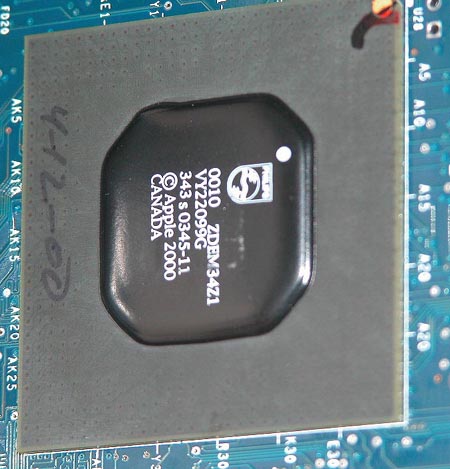
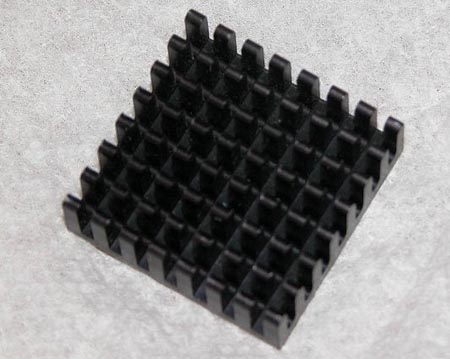
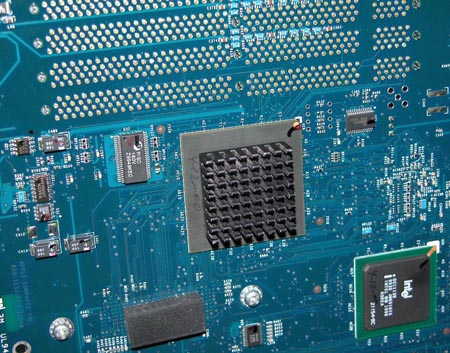
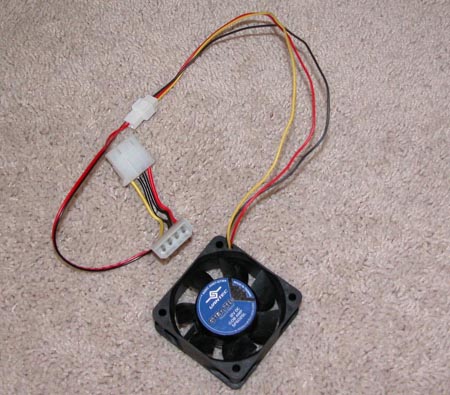
First, cooling is handled in a different manner than in a PC; meaning that on lower clocked G4 CPU there are no heatsink fans. Also, there is an additional heatsink on the back of the logic board that requires cooling. Most importantly, the Apple case design essentially sets up a wind tunnel that blows air across the two heatsinks on the top of the board, and the back of the board. To properly cool all of these components it is necessary to copy the Apple wind tunnel idea when using the logic board in a PC case.
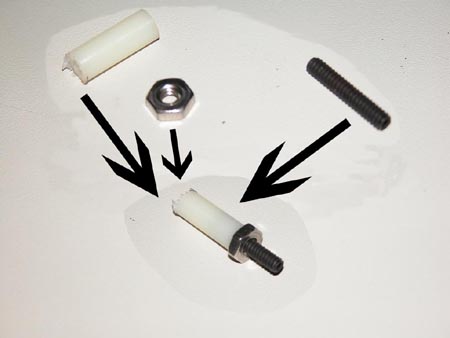
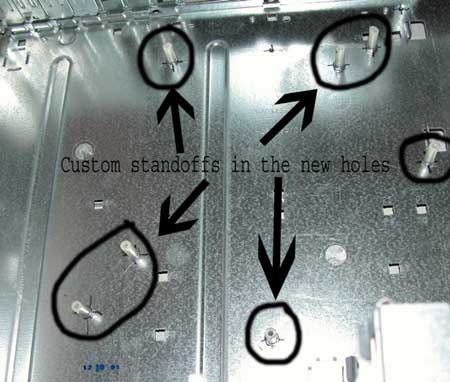
Another consideration is that because of the heatsinks on the back of the logic board more clearance between the board and the case is needed for a G4 logic board than a PC motherboard. To solve this problem a set of large standoffs are needed to give the extra space between the case and motherboard that is needed.
In addition to extra clearance being needed between the board and the case, the holes in the G4 logic board are unlikely to line up with the holes in any PC case, therefore new holes will have to be drilled and tapped in the case to secure the logic board.
Add-on cards, such as USB risers and graphics cards are also a consideration. Basically, for an add-on card to work with Apple hardware, the miniature BIOS contained on the card must have the correct code to operate with the Apple BIOS. While the occasional PC card BIOS may be flashed such that it has the correct BIOS to operate with Apple hardware, there is a high possibility of rendering the card inoperable in the process.
The power supply for Apple G4’s is also different than that of a PC. What is important to note though is that a PC power supply does provide enough power for all of the system components of an AGP graphics logic board to work. Models after the AGP graphics model require two extra power lines, one of which can be ignored.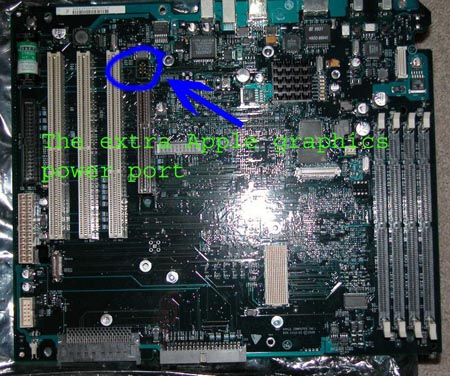
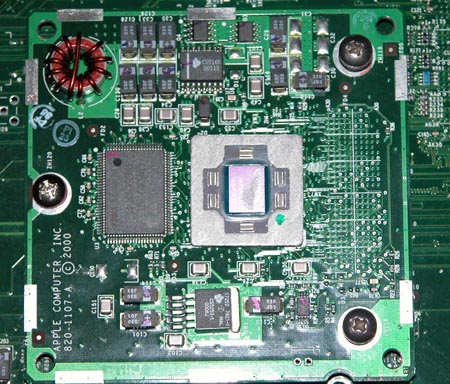
The final important consideration to make note of is the method of attachment for the CPU.
Part III: Purchasing Parts (The first Round) – Late March of ‘04
- A PS/2 to USB converter that was compatible with Apple Computers
- $29.99 from Amazon Market Place
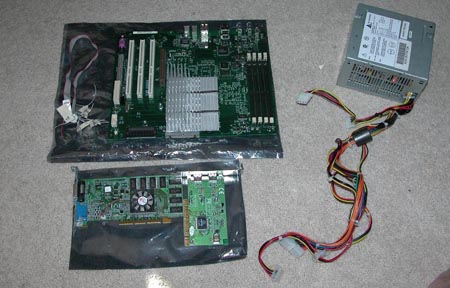
- A combination of a G4 500 MHz processor, ATI Rage 128Pro graphics card, a Power Supply, and an AGP graphics logic board.
- $332.00 from Ebay
- A 60mm Vantec Case Fan
- $6.99 from Outpost
Part IV: Testing (The first part) – Late March of ‘04
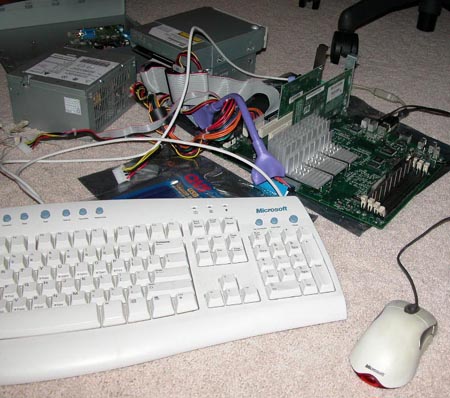
Part V: Purchasing Parts (Second Round) – Early April of ‘04
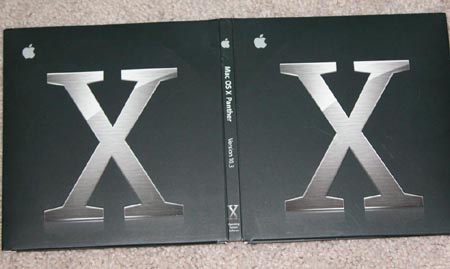
- Macintosh OS X 10.3
- $59.99
Part VI: Testing (Second Part) – Early April of ‘04
With the OS X software on hand the projects testing phase with the first set of hardware continued, however the hardware refused to be responsive to any type of combination of key combinations of start-up sequences. Eventually, after many hours more of research and testing; the hardware was taken to a local Apple specialist to test the logic board, memory, graphics card, and CPU. After two days the results came in the logic board was dead. At this point the project was nearly canceled because of the difficultly in finding another logic board. However, because of the money already invested in the project, it was decided to continue and find another logic board.
Part VII: Purchasing Parts (Third Round) - Mid April of ‘04
- Apple Gigabit Ethernet Logic Board
- $297.00 from eBay
Part VIII: Power Supply – Late April of ‘04
At the time when the Gigabit Ethernet logic board was purchased, insufficient research had been completed about Apple power supplies, as a result it was only found out after the new logic had been purchased that the power supply for the AGP graphic board was incompatible. The incompatibility was due to the differences in the socket and that the APG graphics power supply didn’t supply 24+ to the graphics connector on the mother board for Apple ADC monitors. The ADC capability on the Gigabit Ethernet logic board would never be used but the possibility had to be there. ‘Mirror Drive Door’ Macintosh power supply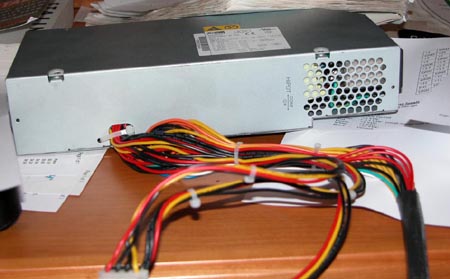
Part IX: Purchasing Parts (Fourth Round) – Late April of ‘04
- Mirror Drive Door Power Supply
- $100.00 from eBay
- Random Hardware for PC case conversion
- $25.00 from Parkrose Hardware (Local Store)
Part X: Modifications – Early May of ‘04
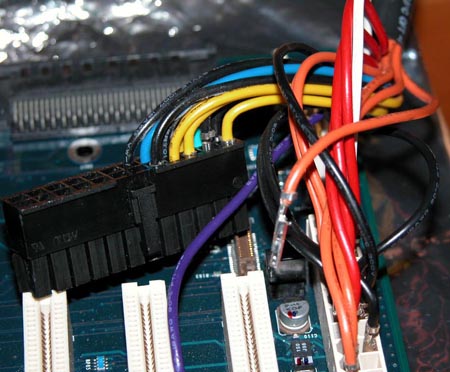
Before testing and construction could proceed the new power supply had to be adapted to the Gigabit Ethernet board. Fortunately, Apple provides power output and input diagrams for the various Apple G4 Power Macintosh models. Once the information on which pins needed in terms of power, it was a matter of rearranging the Mirror Drive Door Power supply to fit.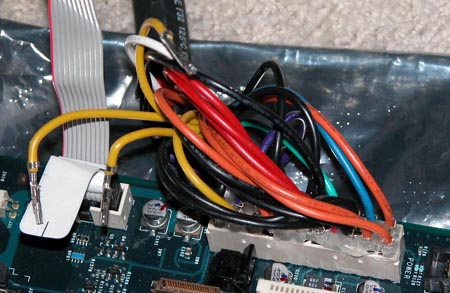
Part XI: Testing (Third Part) – Early May of ‘04
The entire system was reassembled for the third round of testing with the donated memory, hard disk drive, CD-ROM drive, and the other parts which had been purchased. The system booted probably and reached the Apply screen at which point it halted due to the lack of an operating system.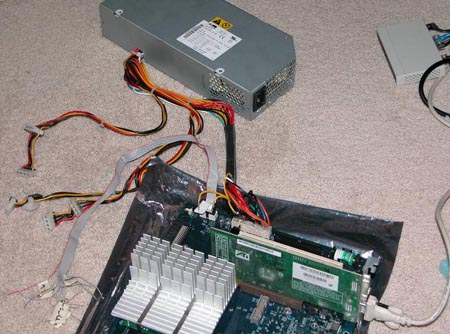
Part XII: Cooling – Mid May of ‘04
Part XIII: OS Installation - Mid May of ‘04
It was decided that the OS should be installed with the hardware out of the case in case of any problems. The borrowed HP CD-RW was used for this as a new compatible drive had not been purchased yet. The installation of the OS went without a hitch onto the old 12GB Maxtor hard drive which was borrowed from another computer for the Macintosh’s system files. There was not any time to play around with it yet since there were still many other things to complete.
Part XIV: Case Construction – Late May of ‘04
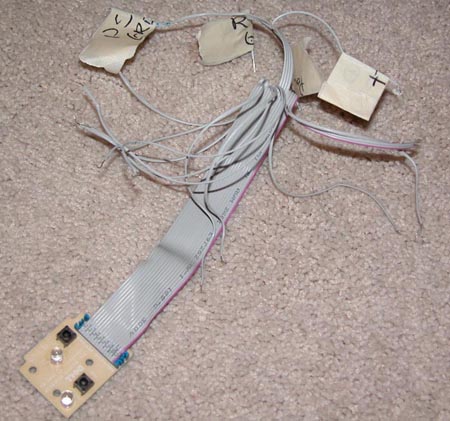
The first part, the power switch that was done involved a painfully long series of tests. First the switch and LED assembly was removed from the PC case.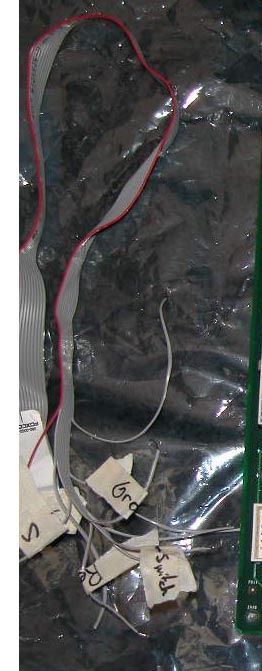
Part XV: Purchasing Parts (Fifth Round) – Early June of ‘04
- Lite-On CD-ROM drive
- $16.99 from Directron.com
- Seagate ATA Barracuda 80GB Hard Drive
- $77.99
Part XVI: Final Bits and Bobs – Early June of ‘04
This Macintosh also had a second purpose. In addition to the Apple computer being build to experience the OS, it was also being built to act as a back-up computer. For the computer to act as a back-up machine a much larger hard drive was needed. A Seagate 80GB ATA Barracuda drive was chosen for the reasons of reasonable cost, noise, and reliability.
Also another CD-ROM drive that was compatible also was needed; a Lite-On was decided on for the purpose because of it’s low cost.
Both of these parts were then purchased and placed in the system, for a complete Apple Power Macintosh G4.
Part XVII: Summary
This project’s objective was to build an Apple Power Macintosh G4 utilizing Apple latest operating system, OS X 10.3. To that end a collection of parts was bought off of eBay, this contained most of the parts needed to construct the system from scratch. However, through testing it was found that the logic board that was contained within that set of parts was defective. To continue, another logic board was purchased, which facilitated the purchase of another power supply. A Mirror Drive Door power supply was then modified such that it would supply power to the correct pins on the Gigabit Ethernet logic board. Next, a PC was taken apart and the parts reassembled to work with a Macintosh. New holes and new standoffs were created to fit the logic board properly. Also the various power switch cables were tested and then soldiered together to control the Macintosh. Finally, a new CD-ROM drive and a second hard disk drive were bought to make the computer usable as a back-up system.
Total Costs
- PS2 to USB converter - $29.99
- Parts Package - $332.00
- Case Fan - $6.99
- OS X 10.3 - $59.99
- Gigabit Ethernet Logic Board - $297.00
- Mirror Drive Door Power Supply - $100.00
- Random PC Case Conversion Hardware - $25.00
- Lite-On CD-ROM drive - $16.99
- Seagate ATA Barracuda 80 GB Hard Drive - $77.99
Total Project Cost: $945.95